Getting Electron Copy/Paste shortcuts working on MAC builds
published:
If you are new to Electron and have noticed that when running the Mac/OSX builds there is no copy/paste shortcut support, don't be alarmed.
The reason for this is that MAC/OSX requires you to have those shortcuts declared/setup in the application menu, or one of it's sub menus.
You can do a simple fix by loading the Electron Menu module in your application's code and setting these shortcuts
Sample Code:
const { app, Menu } = require('electron');

// Callback for the ready event
app.on('ready', () => {
  /*
   This is where your other code would go
  */

  // Check if we are on a MAC
  if (process.platform === 'darwin') {
    // Create our menu entries so that we can use MAC shortcuts
    Menu.setApplicationMenu(
      Menu.buildFromTemplate([
        {
          label: 'Edit',
          submenu: [
            { role: 'undo' },
            { role: 'redo' },
            { type: 'separator' },
            { role: 'cut' },
            { role: 'copy' },
            { role: 'paste' },
            { role: 'pasteandmatchstyle' },
            { role: 'delete' },
            { role: 'selectall' },
          ],
        },
      ])
    );
  }
});
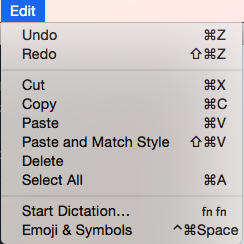
Once you have added this code to your application code, you should see a new menu that looks like the following image
Editor's Note (2026): This post is from 2017 and refers to an older version of the Electron framework. APIs and best practices for Electron have evolved. While the core concepts might still be relevant, the code examples are likely outdated. Please refer to the official Electron documentation for current instructions.